Smart Tech Support

  • Subscribe to our RSS feed.
  • Twitter
  • StumbleUpon
  • Reddit
  • Facebook
  • Digg

Thursday, 17 November 2011

Technology use in the classroom

Posted on 20:56 by Unknown

I must confess that I grew up in the 80’s and was a teenager during the 90’s. The necessities to life as a teen in the 90’s included Aquanet hairspray, Guess jeans, and a sophisticated taste for the fine selection of 90’s music.  Smart phones, social networks, and e-mail were not part of our daily lives.

Fast forward “several” years down the road and a life without such technologies would seem foreign to most of our teenagers.  As I read this interesting article about teenage cell phone usage, I was taken back to my own years as a teenager and how the social norms have changed since that time.

Our students, both children and teens, are using technology on a daily basis. They use it to socialize and to find entertainment. Our jobs as educators is to simply harness that interest to teach students how to use those same technologies in a manner that will be productive when they enter the workforce.

Photo by Wesley Fry, Creative Commons License
Technology in the classroom should be seamlessly integrated. Teachers should focus on planning with the curriculum in mind first and then find ways that the technology can support the student’s learning.

Lastly, technology use within the classroom should be aimed towards teaching students how to adapt the abilities they currently possess to help them learn new technologies.  Our students will not benefit from simply learning how to use a singular program. Rather, teaching students how the skills they learn can be applied to learning new or more advanced skills. This ability to adapt will ensure our students are able to master the technology that they will encounter as a productive citizen.

The social norms that our students face today are more complex than the love ballads of the 90’s. As educators, we can use the current trends in technology usage to equip our students with a valuable skill set that will ensure they are successful in the workforce. Technology use in the classroom is a necessity to prepare our students for the global market.

Guest post by: M. Fulton 
Read More
Posted in | No comments

Technology in the Classroom: Do you get the Picture?

Posted on 13:44 by Unknown

Hello WSFCS.  My name is Marty Creech and I have been given the opportunity to guest blog on the InTouch blog.  Thanks to the WSFCS DIT for allowing me to share my perspective on what technology integration looks like in the classroom and in schools.  I currently teach 6th grade science and social studies.

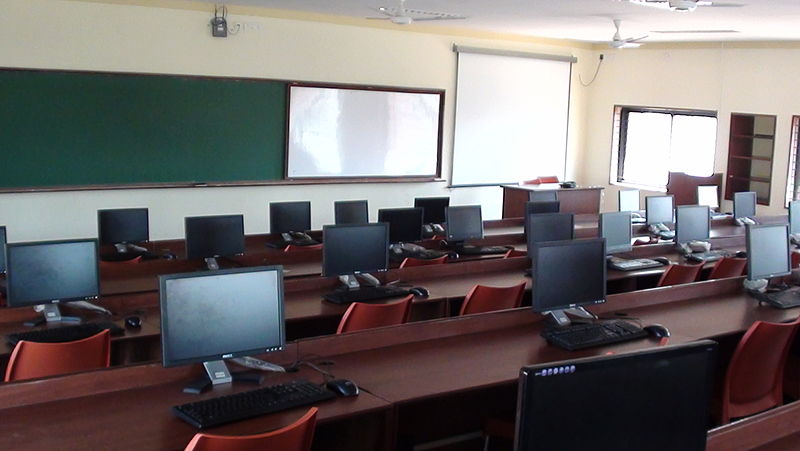
(Photo by Intul using Wikimedia Commons License)
The old adage of a picture being worth a million words could never be truer in the case of technology integration in the classroom.  As you read through this entry notice the pictures of the technologies being used in schools around the world.  Each picture is very different as should be the case with technology integration.  

(photo by Carla of OPLC using Wikmedia Commons license)
In an attempt to promote technology integration, my school district installed a SmartBoard in every classroom.  Did it provide publicity and initiate the rhetoric of technology integration in our county? Yes.  Were teachers excited about this new technology? Yes.  Was this the best technology investment for each classroom? Maybe.  See, when we discuss what technology in the classroom looks like there is no one size fits all technologies out there.  The K-12 curriculum spans from learning the alphabet to advanced Calculus and so on.  The teacher in each of these classrooms would give you a completely different answer on technologies that were needed in their classrooms. The curriculum and student needs should drive what technologies are used in each classroom.

When I first set out on my journey of incorporating technology I wanted anything and everything.  My kids were exposed to podcasts, wikis, blogs, Skype, Quest Atlantis, webquests, and many interactive games.  My students were learning a lot of different technologies.  They were learning many different skills that will indeed help them in their future.  I was doing all these things with no regard to the curriculum I was hired to teach.  Technology guided my curriculum.  My practice was wrong.  I was wrong.  With this realization of my mistakes and their acceptance, I could now grow as a professional.    
(photo by Lft using Wikimedia Commons License)

So, if that isn’t what technology integration looks like in a 6th grade classroom then what does it look like.  First and foremost, my curriculum drives my instruction, my students drive my methods.  Technology enhances and supplements my instruction and helps me meet the diversity of student needs.  My students are all signed up on Edmodo the first week of school.  We use Edmodo as a collaboration tool.  When my students are researching they use it to share resources and ask questions.  This enables my students to learn on their own and learn from others.  It is a line of communication that we can have once our hour of class time is up.  We can continue our discussions and share our knowledge using Edmodo.  Students without internet access are paired up with a buddy they can call to post their questions or comments.  In a dream world I would love for each of my students to have an internet capable device.  With budgets and finances currently this is not possible.  I would love however to have an internet capable device at each of my lab tables.  This would enable students to blog with their groups daily, record in real time data that can be analyzed easily, create back channel discussions with other groups, and would allow us to have a deeper discussion when challenging questions arise and the internet is needed.  This is what some of technology integration would look like in my room.  A whole new picture of technology integration would be painted if you walked in to a math class or a music class.  What does technology integration look like in your classroom?  Is it identical, similar or completely different?
                                          (photo by: Terrance T.S. Tam through Creative Commons License)

I could continue to list off technology after technology but true technology integration is having teachers that are 1) knowledgeable about the technologies available and 2) have the confidence to give them a try.  If each teacher in a school possessed these two skills then technology would be integrated innately and with purpose.  These skills don’t come easy.  It should be a goal of administrators and central office staff to groom teachers to the possibilities of technology integration.

Then when asked to describe technology integration in a school of 30 classrooms it would take 30 million words.  Personally, I prefer the pictures.

Read More
Posted in | No comments

Importing Lessons or Tests from Other Databases

Posted on 10:20 by Unknown
It’s a good idea to create and share tests among co-workers. Why should each teacher create their own work and not share it with others. This is very easy to do in CPS. However, be sure you are working from your single database and share it with one shared database. If you are working with too many databases, you will start to get confused and loose tests. Remember, it’s best to keep your database on the C drive of your computer. The shared database can be stored on a school file server or in the cloud somewhere that all teachers involved has access to. When you import the tests to your database or the shared database, it works best if you copy the shared database to your C drive. Just remember to keep the shared database on the file server (or cloud) current.


Be sure the CPS version you are using is at least 6.70. It is also very important that everyone who is sharing items all have the same version of CPS.

So let’s say someone has imported a test to the shared database and you want to add it to your CPS database. Open your database and click on the “prepare” tab and “lessons and assessments” sub tab. Click “import”. Select the shared database that you copied to your C drive. Click on the plus sign to the left of the shared database name. You will see all the lessons or tests in that database. Put a check in the tests you want to import and click “ok”. You will see the test you imported at the bottom of the list.


Read More
Posted in Brian Piekarski, CPS, einstruction | No comments

Just Press Enter...

Posted on 08:49 by Unknown
I've done a lot of looking around lately. I've worked in the business world, and I've worked in education for quite some time. What I've seen as I've stopped, and sometimes stared, are people using their smartphones, laptops, desktop computers and now tablet devices to be productive in their jobs, communicate, and make collaborative decisions about work and family life.


People live their mobile lives connected to mobile devices and mobile people. That's how we all work, play, and learn. If that is how we work, play and learn the question truly becomes why should technology not be integrated into the classroom? Why should it not mirror business so students can become work-ready, and mirror society, so students can become active civic participants?


I fully understand in tough economic times that technology in the hands of students are equity and money issues, but look around away from your schools and you'll see students from elementary ages through adulthood already using devices of their own, working and participating in online endeavors, living online lives. Like any other tool, technology in the classroom has to be integrated from not just a functional perspective, but also a safety and ethical perspective. Otherwise, the issue becomes a double-edged sword. It can be an avenue to truly engaging learning experiences, or a trail leading down some very negative paths with potentially some very serious consequences.


A research report entitled "Teens Kindness and Cruelty on Social Network Sites" released November 9th by The Pew Internet and American Life Project stated "95% of all teens ages 12-17 are now online, and 80% of those online teens are users of social media sites." Students are weaving their way through the world wide web wilderness with or without guidance or education about safety, ethical, and health issues. Knowing this, we cannot afford to stick our heads in the sand.


Our students need to come out of schools not only knowing how to use technologies, but also how to participate appropriately as informed global digital citizens who can filter the masses of information with which they are bombarded. Media literacy is essential so it should be woven into every lesson using any type of researched resource.


So what does technology integration look like in a well-functioning classroom? As I see it, technology offers three exceptional benefits - the ability to explore, the ability to inform and reform thoughts, and the ability to create responses to what is explored and learned. It's a reciprocal relationship centered around the content. The tools just become part and parcel of the content we are teaching.


Tools will change as technology changes, but the ability to use it to acquire and manipulate information quickly, prompt to think, rethink, analyze, synthesize, and create will always be part of the human experience. We are curious and social by nature, and technology has tapped into those human drives. Successfully integrated technology into classroom learning experiences doesn't make the devices invisible, but they're not the centerpiece of the learning experience. (Photo by Brad Flickinger via a creative commons license)
Read More
Posted in 21st Century, engagement, environment, integration, Mindset | No comments

Tuesday, 15 November 2011

What do you want to do?

Posted on 06:41 by Unknown
32/365The basic goal of education has not changed,  we are preparing students for life-long learning and success in a changing society. The tools and instructional methods used to achieve these goals have advanced dramatically.

Technology is changing the way we live and work since has the power to enhance the teaching and learning process. By stimulating creativity and self-discovery, technology is providing new ways for teachers and students to communicate, collaborate, and create.

I want to develop, support, and encourage creative and critical thinking skills in students using art, music, books, games, drama, technology, and whatever is needed to accomplish that goal. 

When you think critically about something, you have to step outside the box and look at the situation from many perspectives while realizing the impact those could have on your interpretation. When you thinking creatively about something, you also have to step away from the box to look at the situation and identify possibilities, even the ones that may not be apparent to everyone.

What do you want to do? 


image source
Read More
Posted in Melissa Edwards | No comments

Thursday, 10 November 2011

Where Do I Go?

Posted on 10:11 by Unknown


While working in schools, teachers ask me to find resources for them to help enrich their lessons. When I went back to the office I was talking about finding some really great resources and what some of my "go to" sites are with my co-worker Melissa Edwards. She suggested that this should go into a blog.

First stop on the "go to" places that I automatically look at when a teacher asks for help finding resources are: Learning Village; Thinkfinity (and the partner sites); and netTrekker. 
  1. Learning Village is a repository of information for teachers in WSFCS schools. Teachers can find just about everything in Learning Village. There are blackline masters, week by week essentials, pacing guides, lesson plan ideas, and many more things for teachers.

  2. Thinkfinity (which I have written about many times before), consists of several partner sites that teachers can find great resources. There is math, science, language arts, history, humanities, arts, and foreign language lessons that can be found within the Thinkfinity community. Thinkfinity is free and teachers everywhere can access lesson plans from there.

  3. netTrekker is a database that teachers can search for web sites. Teachers can search by subject area, grade level, or keyword. Just in the past few weeks, I have found resources for rocks and minerals, water cycle, and soil. Some of these are web sites, others are interactives teachers can use on their IWB or have students work on using the computers.
 Some other places I find resources are:  reading educator blogs to find out what other teachers are doing in their classroom. I know that everyone is busy and they say they don't have "time" for anything else; especially reading someone's blog post! If you just choose a couple of blogs that you really like and read those, I feel that you will become hooked and look for more blogs. One of the blogs that I get a lot of resources from is "Free Technology for Teachers" by Richard Byrne. He always has some great resources and he always says how they could be used in education.

I follow some great educators on Twitter, along with following the #elemchat stream. Twitter is where educators can quickly share resources with each other or ask if anyone has a resource for a particular item they are getting ready to study. Another resource I use is my Skype group. We have a group of North Carolina educators that chat regularly about resources and helping each other with problems. It is a great group.

You can also find great resources. Next blog I will write about how I organize my resources. Join me, won't you?
Read More
Posted in Dorene Bates, Learning Village, netTrekker, Thinkfinity | No comments

Technology Advice For Administrators

Posted on 04:28 by Unknown
There is so much pressure on school leadership in this day and age. School budgets are growing tighter and tighter. More, now than ever, schools and districts are facing the real possibility of laying off teachers and not having enough in funds to to even keep the doors open to some schools. The vast majority of districts across this country have had to make hard decisions regarding budgets; many of them deciding to make drastic, but necessary cuts in order to save jobs and still give students the best possible education.

There is pressure from state and federal mandates on testing. I see it all the time in the schools that I visit; administrators staring in to computer screens, pouring over spreadsheets, trying to figure out where their students are and where they need to be in terms of testing. Many spend late nights in their offices in April and May thinking of ways to give their students the edge they need to pass the test.

With all of these external pressures there is little time for school leadership to encourage teachers to take risks in their classroom and be creative in terms of technology. However, I believe there are 5 simple things that school leadership can do to help teachers as they transition their classrooms to Web 2.0 learning.

1) Why do we even need to be having this conversation? Why do we need to change? Watch Did You Know 4.0 to understand what will happen if we do nothing. There is a great wiki that goes with the video, well worth your time to check out as well.  (Also check out this post on the best TED Talks for School Leaders.)


2) What do good school leaders do? Check out this short presentation from 2 of the best and most connected administrators in education. Which qualities do you exhibit? Which do you need to work on to support technology in your school or district?

Connected Principals (Classroom 2.0 Presentation)
View more presentations from George Couros

3) Become familiar with the NETS for Administrators- The National Education Technology Standards (NETS) for Administrators have been around since 2009. According to the NETS website: "The NETS for Administrators enable us to define what administrators need to know and be able to do in order to discharge their responsibility as leaders in the effective use of technology in our schools." The NETS provide guidance to school leadership on everything from learning culture to professional practice to digital citizenship. Many of the Standards only require the encouragement, vision and assurance from the administration to ensure that technology is being used to re-shape learning in their buildings.

4) Grow your PLN- Just like teachers, administrators and school leadership need a Professional Learning Network (PLN). Your PLN is there for you to share ideas with, listen to your problems but most of all help you grow ideas you have. Your PLN consists of people who are just like you, that you can turn to when you need that point of view you can't get from anywhere else. One of the best and easiest ways to create a PLN is to join Twitter. There are 100's of school administrators there right now waiting to network. Check out the Principals page on Twitter4Teachers to start. There is also a wonderful hashtag, #cpchat, that many social media using administrators use. (Oh, and if you need more information on how to get the most out of Twitter or how it works, visit my Twitter Livebinder, with over 150 resources.) There are other groups too like Classroom 2.0 on Ning and groups on LinkedIn. The point here is that you are not alone. Learning does not take place in isolation. Reach out and learn and share with others.

5) Provide Time and Encouragement-This is the one that inevitably will be the hardest to do. School leaders have to provide teachers (and themselves) the time and opportunity to learn about new tools and techniques for their classroom. I have already documented all of the pressures on school leaders but in order for our students to be successful we have to understand that the face of education is changing. The way the students learn is changing. Most teachers are not going to be able to make the drastic changes needed overnight. They are going to need time to learn. It is vital that school leaders provide the time needed. More over, and I believe, more important, school leaders must provide an environment in their school for teachers to take risks and encourage teachers to make the change in their teaching. Teachers are not going to make a change or take a risk if there isn't support from their school leadership.


Lastly, check out my most recent post from Leadership Day 2011. And ask yourself, are you a Lone Nut Leader?

Administrators and school leaders need to be agents of change. It should not be the teachers who have to fight for change in their classroom. They should be able to walk hand-in-hand with their administrators to make strides in changing our classrooms from the 18th century to the 21st.


What other suggestions do you have? Leave some comments below. 
Read More
Posted in Leadership, Steven Anderson | No comments
Newer Posts Older Posts Home
Subscribe to: Posts (Atom)

Popular Posts

  • Why can't I turn down the pages?
    If you find something you like on a page in a book, what do you do? Turn down page corners ... Underline ... Highlight ... Jot in the margin...
  • What are WS/FCS teachers saying about Edmodo?
    Over the past few weeks I have had the privilege to work with teachers across the district who are using Edmodo in their classrooms. Wheth...
  • Timeline = Understanding?
    I was looking through some NC History information that involved lots of dates and events. I am also reading a novel that gives lots of dates...
  • Do You Have a PLN?
    The last couple of weeks I have had some technology issues that I had either forgotten about or had never heard of before. I started to thin...
  • What I Learned This Week ...
    This was a very interesting week. I was at several different schools meeting with teachers during their grade level planning times. I listen...
  • Working with Layers and ActivInspire
    Lately I have been learning a lot about ActivInspire software for Promethean boards. I must say that I have really been enjoying seeing what...
  • Listening is Powerful
    This past week I have been attending PLC and LTM meetings in my elementary schools and talking about how I could help them with technology a...
  • What are you learning about this month?
    In March, one of the themes is Women's History Month. I came across this while looking at Thinkfinity today: The theme for the 2012 Wom...
  • What is a Teacher Lock?
    Did you know that in ActivInspire you can lock down your flipchart page? No, well guess what... you have the option to do that. If we have...
  • What The Heck Are QR Codes?
    Have you seen these around town where you are lately? I was a little surprised when I saw them all over the Black Friday ads back in Novembe...

Categories

  • #edchat
  • 21st Century
  • ActivInspire
  • activities
  • Administrators
  • adult learning
  • animoto
  • April Patterson
  • Art
  • assessment
  • Atomic Learning
  • Audacity
  • Black History Month
  • blog
  • Blogging
  • Bloom's Taxonomy
  • books
  • brain research
  • BrainPOP
  • Brainstorming
  • Brian Piekarski
  • broadcast
  • calendars
  • Celia Gossett
  • change
  • civics
  • Classroom 2.0
  • classroom design
  • collaboration
  • Colleen Fitzgerald
  • Common Core
  • CommonCraft
  • Conferences
  • connections
  • copyright
  • CPS
  • creativecommons
  • creativity
  • critical thinking
  • Curriculum Pathways
  • DE Streaming
  • DeLea Payne
  • Desiree Miles
  • DESTech101
  • digital
  • digital footprint
  • digital storytelling
  • Diigo
  • document camera
  • Dorene Bates
  • earth day
  • ebooks
  • edcamp
  • Edmodo
  • Edublog Awards
  • education
  • einstruction
  • ELA
  • elections
  • Emory Maiden
  • encyclopedia
  • engagement
  • english
  • environment
  • evaluation
  • Evan Herreid
  • Evernote
  • flickr
  • gadgets
  • geography
  • global
  • glogster
  • Google
  • Google Earth
  • grants
  • Hashtag
  • health
  • history
  • Ideas To Inspire
  • Ihttp://www.blogger.com/img/blank.gifWB
  • images
  • Infographics
  • Inquiry
  • inspiration
  • Instructional Technology
  • integration
  • interactive
  • Internet Safety
  • IRC
  • IWB
  • Kerpoof
  • Leadership
  • Learn and Earn
  • Learn360
  • learning
  • Learning Village
  • LearnNC
  • literacy
  • Literature
  • LiveBinder
  • livebinders
  • Mandy Durrence
  • mapping
  • Marlo Gaddis
  • Marty Creech
  • math
  • media
  • Melissa Edwards
  • microsoft
  • Mindset
  • mobi
  • mobile
  • Moodle
  • multiple intelligences
  • NASA
  • NCTIES
  • NCVPS
  • NCWiseOwl
  • netTrekker
  • news
  • newscast
  • Ocean Portal
  • online learning
  • organize
  • parents
  • PLN
  • podcasting
  • presentationtools
  • Prezi
  • Primary Source Documents
  • professional development
  • Project Based Learning
  • promethean
  • QR Codes
  • Quest Atlantis
  • questions
  • reading
  • RSS
  • scholastic
  • Schoolwires
  • science
  • search engines
  • SimpleK12
  • simulations
  • skype
  • SMART
  • social bookmarking
  • Social Media
  • social studies
  • STEM
  • Steven Anderson
  • strategies
  • StudyBlue
  • StudyLadder
  • summer
  • Symbaloo
  • teacher tips
  • TeachersDomain
  • technical
  • technology
  • Technology Coaches
  • technology integration
  • TED
  • Television
  • Thinkfinity
  • Tiki-Toki
  • timelines
  • TPACK
  • training
  • Twitter
  • video
  • virtual field trips
  • virtual worlds
  • vocabulary
  • voicethread
  • Weather
  • web 2.0
  • web-based tools
  • webcam
  • Webinars
  • websites
  • Wife Swap
  • wikis
  • Wonderopolis
  • wordclouds
  • wordle
  • Works
  • writing

Blog Archive

  • ▼  2013 (19)
    • ▼  November (4)
      • Why can't I turn down the pages?
      • School News: Drum Up Some Business
      • The Instructional Technology Wife Swap
      • Symbaloo!!!!!!
    • ►  October (2)
    • ►  September (3)
    • ►  August (2)
    • ►  June (1)
    • ►  May (3)
    • ►  April (2)
    • ►  February (1)
    • ►  January (1)
  • ►  2012 (104)
    • ►  November (3)
    • ►  October (5)
    • ►  September (3)
    • ►  August (6)
    • ►  July (5)
    • ►  June (12)
    • ►  May (10)
    • ►  April (17)
    • ►  March (17)
    • ►  February (13)
    • ►  January (13)
  • ►  2011 (268)
    • ►  December (16)
    • ►  November (21)
    • ►  October (21)
    • ►  September (19)
    • ►  August (14)
    • ►  July (21)
    • ►  June (37)
    • ►  May (26)
    • ►  April (24)
    • ►  March (29)
    • ►  February (23)
    • ►  January (17)
  • ►  2010 (109)
    • ►  December (17)
    • ►  November (29)
    • ►  October (12)
    • ►  September (13)
    • ►  August (11)
    • ►  July (16)
    • ►  June (11)
Powered by Blogger.

About Me

Unknown
View my complete profile